HostMeUp — Google Drive Clone
A self-hosted file storage service with GitHub OAuth, per-user storage limits, and S3-backed object storage. A lightweight, Dockerized Google Drive alternative you can run on your own VPS.
- Node.js
- Express.js
- PostgreSQL
- Drizzle ORM
- AWS S3
- GitHub OAuth
- Docker
Problem
I wanted a small, single-tenant file store I could host on my own VPS — somewhere to drop screenshots, build artifacts, and the occasional document, with a real auth story and no surprise bills. Google Drive solves the user-facing problem brilliantly; what it doesn't give you is the ability to run the whole thing on hardware you already own and pay for.
The constraints were: it has to use S3 for actual bytes (so I'm not running an object store on my Pi), it has to authenticate against something I already trust (GitHub OAuth), and it has to enforce a per-user quota — otherwise giving a friend an account is a slow-motion bandwidth bill.
Approach
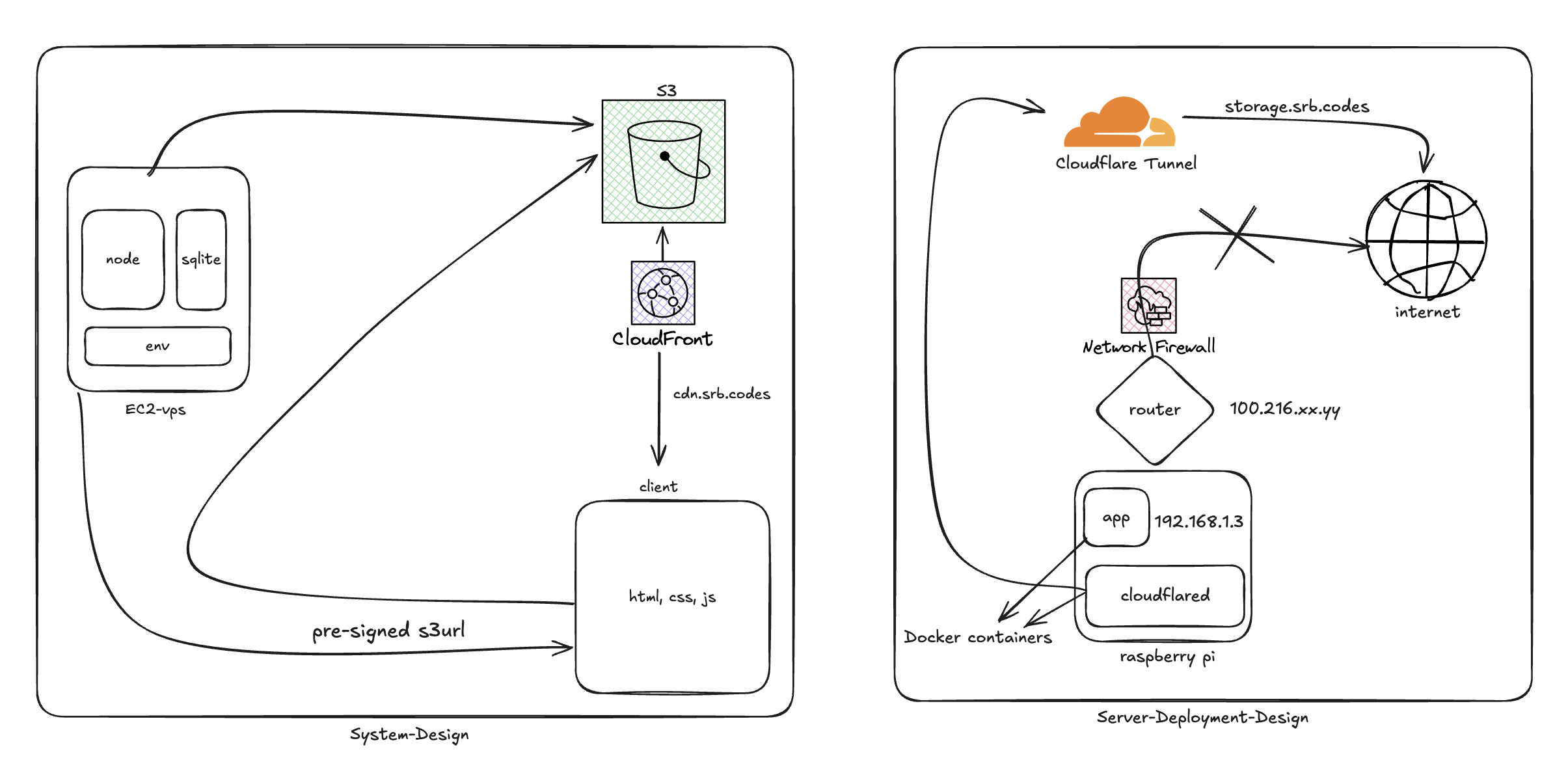
The architecture is a deliberately boring three-tier app, with one twist around uploads:
Browser (React + Vite)
      ↓ HTTPS
Express API ─── PostgreSQL (Drizzle ORM)   ← metadata, users, quotas
      ↓ presigned-PUT
   AWS S3                                  ← object bytes only
- The user signs in with GitHub OAuth. The server exchanges the code, persists the user, and issues a JWT for subsequent API calls.
- To upload, the browser asks the API for a pre-signed S3 PUT URL for the chosen filename. The API checks the user's quota in Postgres, mints the URL with a short TTL, and returns it.
- The browser uploads directly to S3 against that URL — bytes never traverse the API server. When the upload finishes, the browser confirms with the API, which inserts a row in the
filestable with the S3 key, size, MIME type, and owner. - List/delete are normal CRUD against Postgres. Delete removes the S3 object as well.
Quotas are enforced before the presigned URL is issued. There's a 1 GB default per user, stored as a column on the user row; the upload size is required up front so the check is a single arithmetic compare against the user's current sum.
Components
| Layer | Tech | Responsibility |
|---|---|---|
| Backend | Node.js, Express | REST API, auth, quota enforcement, presigned URL minting. |
| Database | PostgreSQL via Drizzle ORM | Users, files, quota usage. Migrations as code. |
| Object Store | AWS S3 | The actual file bytes. Direct browser upload via presigned PUT. |
| Auth | GitHub OAuth + JWT | Sign-in flow + bearer-token API auth. |
| Frontend | React, Vite | File list, upload, delete UI. |
| Deployment | Docker, docker-compose | Whole-stack on any EC2 / VPS. |
Key decisions
- Pre-signed PUT, not "upload to the API". Streaming uploads through the API server is the easy mistake — it doubles bandwidth, ties up Node's event loop on big files, and forces you to handle multipart yourself. Presigned PUTs delegate all of that to S3 and turn the API into a thin metadata service.
- GitHub OAuth, not email/password. Self-rolling auth is a tax on shipping. Most realistic users for a self-hosted file store already have a GitHub account; outsourcing identity to GitHub eliminates the password-reset and email-verification surface entirely.
- Drizzle, not raw SQL or Prisma. Drizzle's migrations stay close to SQL, the types are derived from the schema (no codegen step), and the bundle size matters for a small service. The schema is small enough that the trade-off was practical, not religious.
- One container per process, orchestrated by docker-compose. No Kubernetes, no Helm. The whole thing is
cp .env.example .env && docker compose up, which is exactly the deploy story I wanted.
Lessons learned
- Quota enforcement belongs at presign time, not upload time. S3 will happily accept a presigned PUT for any size up to its limits. If you check quota only when the browser confirms upload, you've already burned the bandwidth. Sign URLs with a
Content-Lengthconstraint and reject up front. - Soft-delete is overkill until it isn't. I started with hard deletes. The first time I deleted a file by accident I added a
deleted_atcolumn. The schema migration was 30 seconds; the recovered file was worth more. - CORS on the bucket is the silent failure. The browser-to-S3 PUT will appear to "just not work" until you allow your origin in the bucket's CORS config. The repo includes the exact policy under
docs/s3config.mdso the next person doesn't lose an hour to it.
Architecture
Links
- Try it: cloud.srb.codes
- Source: github.com/sourabhs701/hostmeup